Property Management · n8n Workflow Automation
Property Management — Connected Automation System
Portfolio DemonstrationFour connected n8n workflows that demonstrate real business applications directly on the canvas - Google Sheets, Google Drive, Gmail, Slack, Google Calendar, an HTTP Request representing GoHighLevel, and a real OpenAI classification node - while limiting custom code to exactly 3 justified nodes system-wide.
Problem
Manually triaging maintenance requests, matching vendors, tracking work orders, and staying on top of SLAs is slow, inconsistent, and easy to lose track of - especially across many properties and after-hours emergencies.
System Design
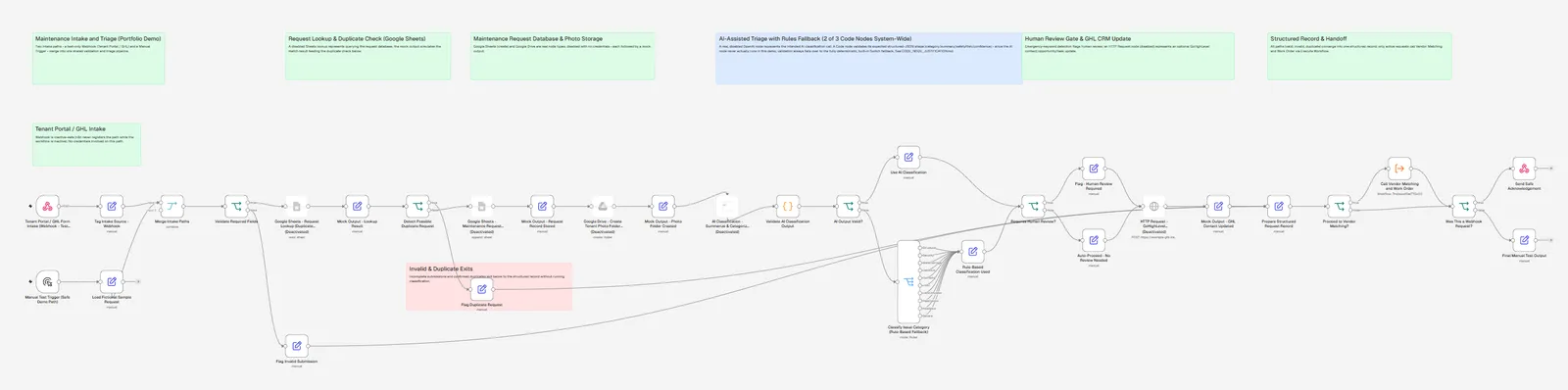
Workflow 1 captures a request (Webhook or Manual Trigger), looks it up for duplicates (Google Sheets), validates and classifies it (AI node + rules fallback), stores it and its photos, then calls Workflow 2 directly via a real Execute Workflow node. Workflow 2 looks up the vendor directory (Google Sheets), filters and scores candidates in a real Loop Over Items cycle, creates the work order, and drafts communications. Workflow 3 runs independently on a schedule, sweeping whatever work orders exist in the database and escalating anything overdue or unresolved. Workflow 4 is wired into workflows 1, 2, and 3 via each one's Settings -> Error Workflow field - n8n calls it automatically on a real execution failure, with no manual "on error" nodes cluttering the other three canvases.
Workflow Stages
- 01Maintenance Intake and Triage
- 02Vendor Matching and Work Order
- 03SLA and Escalation Monitor
- 04Automation Error Handler
Tools Used
- n8n
- OpenAI
- Google Sheets
- Gmail
- Slack
- Google Drive
- Google Calendar
- HTTP Request
- Webhook
- Aggregate
Safety & Human Review
- All 4 workflow names begin with DEMO | and all remain inactive.
- Zero credentials attached anywhere in the system.
- Zero enabled external-send nodes - every Gmail/Slack/Sheets/Drive/Calendar/HTTP Request/OpenAI node is disabled.
- The Webhook (Workflow 1) and Schedule Trigger (Workflow 3) are both inert while their workflows are inactive - n8n never registers a webhook path or fires a schedule for an inactive workflow.
- The Manual Trigger path in every workflow completes safely with zero credentials, because n8n skips disabled nodes at execution time (data passes through unchanged to the following Mock Output node).
- All fictional data uses example.com emails and invented names/addresses.
Implementation Evidence
Real screenshots of the working system — collapsed by default so this page stays readable.
What's Working
14 structural checks passed, including: All 4 workflow JSONs parse (local + server-returned copy); All 4 active are false; All 4 names begin with DEMO | Property Management |; Zero credentials attached anywhere in the system. Structural and safety validation completed against the live, API-returned copy of all 4 workflows, plus a Node.js syntax-check of all 3 Code nodes. Live in-n8n execution pending manual safe test (see limitation below).
Limitations & Confidentiality
Every app integration is a disabled placeholder with mocked output - nothing is actually read from or written to a real Google Sheet, Drive folder, Calendar, inbox, Slack channel, or AI model. The AI classification path is structurally present (real OpenAI node + output-validation gate) but never actually reachable in this demo, since the node is always disabled - the rules-based Switch fallback always runs instead. Live n8n execution (clicking "Execute Workflow" in the editor) has not been performed as part of this automated build.
Portfolio demonstration built for a fictional business with fictional data. It is not connected to any real client, system, or customer.
Have a similar workflow to automate?
I'll tell you honestly whether automation is the right fix.